3 Things Your Apple Watch App Must Have
Best Practices for Developing Apple Watch Apps
It’s been a relatively slow launch for the Apple Watch. Apple succeeded in jumping right to the front of the smartwatch pack with its elegant little wrist buddy. But the smartwatch itself is a completely new product category, still trying to prove its necessity. Right now, it’s reserved for early adopters and Apple die-hards. Our team of app developers in San Francisco believe this is going to change quickly. And how.
The good news is best practices for developing Watch apps are being updated in real time. That’s fancy talk meaning we learn more and more with every app released. Apple has been a great help to the development community with the awesome Watchkit development tips, the aptly-named Human Interface Guidelines, as well as the guide to the upcoming watchOS 2.
So what’s working for Apple Watch apps?
An Emoji is Worth a Thousand Words
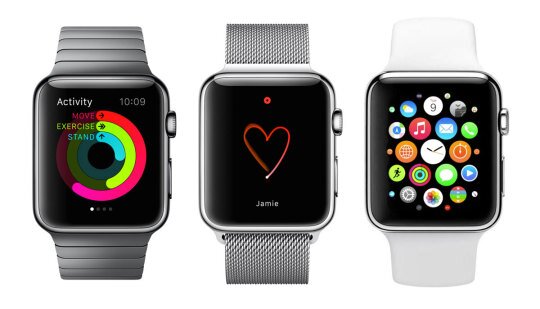
Let’s face it. Apple Watch functionality pales in comparison to iPhone. It’s not designed to replace the phone, but to augment it. The thing people love best about phones is that they are, first and foremost, communication devices. The question then, is how can Watch communicate better than iPhone? Simple. Using emoji, icons, stickers — let’s call it “picture chat.”
When Apple claimed the Watch was the most personal device they’ve ever created, it wasn’t just marketing fluff. Symbols are as old as language itself, and sharing these little pics with your friends and loved ones adds a unique flavor to your communication. A little bunny blowing you a kiss conveys much more emotion than trying to draw a flower with your shaky finger on a tiny touch screen. To see Watch chat done right, check out WeChat and WatchMe.
Black is the new Black
Haven’t you noticed? Most of the backgrounds for Watch apps are black. That’s a move to save power on the Apple’s first OLED device. The Watch is already being dinged for a mediocre battery at launch. Every bit of extra juice counts. Unlike LED screens which use a power-hungry backlight, OLED pixels switch off when displaying black. That gives you a nice, rich, deep black with excellent contrast. When you are using your Watch in quick, ten-second glances, that contrast is critical.
Think Small, Think Fast
It’s pretty easy to pull your iPhone out of your pocket. You do it all the time. So if you’re using an Apple Watch, specifically so you don’t have to pull out your phone, there needs to be some added benefit. The implicit benefits are speed and accessibility. Watch apps need to be designed with a user experience that lasts only seconds. That’s how long it takes to glance at your wrist.
Instagram’s Watch app is an excellent example. It doesn’t try and shove the entire social network onto your wrist. Functionality has been pared down and then pared down again to the very core functionality of the social photo service. The app simply flashes photos from a selected group of friends so you’re not inundated with notifications. Users can instantly respond with, guess what, a like or an emoji. Ten seconds, and you’re out. That’s a good time.
If you have app questions please contact our web developers in San Francisco today.
